Bambu Lab X2D vs A2L: Which 3D Printer Is Best for a Sailboat?

A comparison for use of Bambu Lab 3D printers on a sailboat

A 3D printer aboard a sailboat can turn a frustrating search for a small replacement part into an afternoon project. It can produce a cupboard spacer, a cable guide, a custom holder, or a prototype that helps solve an awkward installation. For a cruising family, it also becomes a creative workshop for toys and practical learning. However, choosing a printer for a boat requires different priorities from choosing one for a house.

Between the Bambu Lab X2D and A2L, my preference for a carefully planned permanent onboard workshop is the X2D, provided the boat can accommodate its electrical requirements and ventilation. The A2L makes more sense when larger prints, a lower purchase price, and everyday creative projects matter most. This is a researched comparison based on manufacturer information and practical installation reasoning; it does not claim hands-on testing of either printer at sea.
The machines pursue different goals. Bambu positions the X2D around dual-nozzle printing and controlled chamber temperatures, while the A2L emphasizes affordable large-format production. The X2D offers a main-nozzle build area of 256 × 256 × 260 mm; the A2L provides 330 × 320 × 325 mm. The X2D's shared dual-nozzle area is smaller, at 235.5 × 256 × 256 mm. These dimensions matter when a supported part approaches the machine's limits. [1][2]

For boat owners, the decision starts with a list of intended projects. Someone making camera brackets, cabin organizers, small replacement covers, and installation templates has different requirements from someone printing large storage trays. Both approaches can be useful. The mistake is purchasing extra capacity without identifying whether that capacity means larger objects, more demanding materials, or simply more colors. Aboard a yacht, every additional capability competes with living space, electricity, and maintenance time.
Space deserves attention before print speed. Measure the intended installation and the entire route into the boat: companionway, doors, corners, and any narrowing beside furniture. Then measure the operating space, allowing for moving components, cables, filament routing, access panels, and maintenance. A machine that fits through the hatch may still be impossible to service where it sits. On Prosperity, where bringing a large printer aboard has already involved a difficult doorway, this is a particularly relevant consideration.
The A2L's published dimensions are 544 × 529 × 505 mm, and its weight is 12.8 kg. Those are substantial dimensions in a cruising boat's interior. Its open construction also means the surrounding space must accommodate the printer's operation rather than merely its parked outline. Before committing a shelf or worktop, use a cardboard mock-up and check the required movement clearances against the installation guide. Filament equipment needs its own space too. [2]

An enclosed machine offers a more defined boundary between the workshop and everyday life. That makes the X2D conceptually attractive in a cabin shared with children, a dog, cooking equipment, and clothing. Nevertheless, its enclosure is not a marine protective housing. It does not make the printer waterproof, saltproof, or suitable beside an open companionway. A protected installation should still keep dripping swimwear, spray, and condensation away from the machine and its electrical connections.
Both printers need secure retention. Rubber feet and a heavy base are insufficient when a boat heels, pitches, or encounters a wake. My installation preference would be a rigid platform secured to suitable structure, with restraints that prevent the printer shifting without distorting its frame. Access and cooling must remain available. Filament spools, accessory boxes, and loose tools also need restraint; securing the printer while leaving several kilograms of supplies free to move solves only part of the problem.
Boat movement introduces another important distinction. The X2D's CoreXY layout keeps the build platform from repeatedly travelling fore and aft during normal layer printing. The A2L moves the build platform as part of its printing process. As an engineering inference, I would prefer the former arrangement for a permanent boat installation, particularly for tall objects. However, that preference is not evidence that the X2D will print reliably in a seaway, and it should not be presented as such.

Bambu gives the A2L adaptive vibration compensation and integrated granular dampers. These features address the printer's own motion and resonance; they do not establish suitability for unpredictable vessel movement. A passing motorboat can introduce acceleration very different from normal printing vibration. My operating plan for either machine would therefore begin in a marina or sheltered anchorage, using modest test prints. Offshore printing would remain an experiment, rather than a capability on which to depend. [2]
Electrical demand can decide the purchase before any material comparison does. Bambu's published maximum input power at 220 V is 1,600 W for the X2D and 1,000 W for the A2L. These are maximum ratings, not a claim that either machine continuously consumes that amount throughout a print. They nevertheless matter when checking whether an inverter, battery system, and electrical installation can support startup and heating alongside the boat's existing loads. [3]


The A2L also has separate high-voltage and low-voltage versions, specified for 200–240 V and 100–120 V respectively. Check the particular machine's label rather than assuming universal input compatibility. A cruising itinerary involving different shore-power supplies makes this especially relevant. Buying locally in Europe does not remove the need to confirm the printer's requirements, and changing countries does not change the voltage supplied by an onboard inverter. Match the appliance to the actual electrical system. [4]
Battery planning requires energy measurements rather than maximum power alone. As an illustration, a printer averaging 150 W over four hours uses 600 Wh at its AC input. At an assumed 90 percent inverter efficiency, that represents approximately 667 Wh from the battery, before other loads. On a nominal 12.8 V system, that is about 52 Ah. These figures are an example of the calculation, not measured consumption for either printer or a prediction of your installation.
Measure several representative jobs with an energy meter: a small PETG part, a long print, and any higher-temperature material you intend to use. Include a filament dryer if one is operating. Record both heating peaks and total watt-hours. This produces a useful onboard budget and helps schedule work during solar production or shore-power availability. A printer's purchase price is immediate; its energy demand becomes part of the daily cruising routine, alongside refrigeration, computers, and communications.

Material choice is where the X2D's case becomes strongest. Its enclosed chamber can be actively heated to 65°C, and Bambu describes support for materials including ABS, ASA, and nylon. The A2L has a maximum bed temperature of 80°C and is principally positioned for PLA, PETG, and other less demanding filaments. Both advertise a maximum nozzle temperature of 300°C, but nozzle temperature alone does not provide the controlled environment needed by every material. [1][2]

For useful boat projects, begin with the part's environment. A drawer divider inside a shaded cabin has different requirements from a cover mounted in the cockpit. Consider sunlight, temperature, bending, impact, sustained loading, and contact with cleaners. Select the filament from its technical data and then design for that material. It is easy to print something that looks convincing; ensuring it remains useful after months aboard is a separate task involving both material selection and geometry.

PETG would be a sensible starting point for many noncritical onboard experiments, including organizers, equipment cradles, and clips. I would make small samples and assess their stiffness, fit, and performance in the intended location before producing a larger batch. PLA remains useful for prototypes, teaching models, and checking dimensions, but its heat tolerance deserves attention in a Mediterranean cabin. Neither a filament's popularity nor a clean-looking print proves suitability for a particular installation; consult the specific product's data sheet.
For exposed exterior accessories, ASA gives the X2D a meaningful advantage. Bambu's ASA guidance emphasizes UV and weather resistance and specifies an enclosed printer, while also warning about warping and ventilation. That makes ASA worth considering for suitable noncritical outdoor parts rather than selecting a filament purely because it is easy to print. The X2D's controlled chamber provides a more appropriate starting point for this work; the final design still requires realistic service testing. [5]
Neither machine turns printed plastic into certified marine hardware. I would use printing freely for templates, covers, spacers, organizers, and prototypes, while retaining properly specified components for rigging, steering, fuel systems, and other consequential applications. The same caution applies to a mount whose failure could lose expensive equipment overboard. Evaluate the load path, fasteners, layer orientation, and long-term deformation. Carbon-filled filament or a more expensive printer does not automatically make an untested design dependable.

The X2D's second nozzle is especially interesting for complex shapes. Bambu uses a main direct-drive extrusion system and an auxiliary feed system, allowing a separate support material. For the right material pairing, this can make supports easier to remove and reduce surface damage. It can also avoid repeated material changes through a single nozzle. The practical onboard value is better access to awkward geometries, although benefits depend on the model, filament combination, and slicing choices. [1]
Consider a custom cradle for an instrument or an adapter that must fit around existing furniture. If support contact affects a mating surface, easier removal can reduce cleanup and repeated fitting attempts. Conversely, a flat cable clip may gain nothing from a second nozzle. The A2L's single-nozzle workflow remains sufficient for many projects. Before valuing dual extrusion highly, examine your likely designs and ask how often a support interface would actually improve the finished part.
The A2L's larger build area offers a different practical benefit: fewer projects need to be split into sections. Large drawer inserts, storage trays, and teaching models could fit in one piece when they exceed the X2D's limits. Fewer joints can simplify assembly, but a large print also ties up the machine longer and puts more material at risk if it fails. On a boat, designing modular pieces can still be attractive even when the printer accommodates the complete object.
Humidity needs its own plan. A closed printer chamber and a dry filament container serve different purposes. The X2D Combo is offered with AMS 2 Pro, whereas Bambu's announced A2L Combo includes AMS lite. AMS 2 Pro provides sealed storage and active drying up to 65°C. That is a useful distinction for onboard filament management, although the appropriate drying temperature depends on the filament and not every material can be properly dried at that temperature. [1][2][6]
I would store spare filament in sealed containers with suitable desiccant and keep a record of drying requirements. Feed arrangements should remain secure and avoid tight bends or snagging when the boat moves. Buying many colors initially creates more storage work than buying a few materials that suit actual projects. For a cruising workshop, one well-managed spool can be more valuable than a large selection of neglected filament. Budget for humidity control alongside the printer, rather than treating it as an optional later purchase.
Air quality is particularly relevant when the workshop shares the family's living space. NIOSH documents particle and chemical emissions from desktop printing and recommends controls including ventilation and filtration. The X2D includes three-stage filtration, but that specification should not be treated as proof of clean cabin air under every printing condition. I would plan effective ventilation for either machine and assess extraction particularly carefully before regularly printing higher-temperature materials in an occupied boat interior. [1][7]
Cooling and ventilation must work together. Putting a printer inside a cupboard may improve tidiness while creating an unsuitable environment for its electronics or disrupting airflow. Check the permitted ambient conditions and leave the manufacturer's cooling paths unobstructed. Extraction arrangements should remove emissions without undermining the printing process. On a hot Greek afternoon, relocating or rescheduling a job may be more sensible than expecting the printer to compensate for an overheated cabin. Installation quality matters as much as nominal machine capability.
Noise is another shared-space issue. Bambu publishes below 50 dB for the X2D and below 49 dB in the A2L's silent mode, but those figures are not directly comparable without matching measurement conditions. More importantly, a yacht's furniture can transmit vibration into nearby sleeping spaces. I would trial the installation during normal family activity before deciding where it belongs permanently. Lower acceleration may make printing less intrusive, although longer job times can offset some of that benefit. [1][2]
Cruising convenience also depends on preparation. Keep local copies of useful designs, editable project files, filament settings, and maintenance instructions before leaving reliable connectivity. Test the intended local or offline workflow on the actual machine and firmware rather than discovering its requirements in a remote anchorage. For Prosperity, the existing onboard computer and network could support a practical design archive. Include dimensions and notes explaining which printed revision fits, so replacing a successful part does not require repeating the entire design process.
Maintenance should be planned around access and availability. Carry a sensible selection of model-specific wear items, such as an appropriate spare hotend or nozzle, PTFE tubing, a build plate, and the consumables named in the maintenance guide. Protect supplies from moisture and label them clearly. Two nozzles create additional components to understand, while an open printer may be easier to inspect. Neither factor establishes overall reliability; serviceability aboard and access to replacements are more useful purchasing questions than assuming complexity or simplicity alone determines durability.
A fair comparison should also consider the time spent designing. A printer cannot identify the correct dimensions of an obsolete fitting simply from the broken original. Accurate measurements, test pieces, and revisions often contribute more to success than faster motion. I would start with a simple spacer or holder, record the results, and gradually expand the workshop's responsibilities. This builds confidence without consuming large quantities of filament. For children aboard, the same process offers an excellent lesson: measure, draw, print, compare, and improve. Either machine can support that learning, while its more advanced features become useful as skills develop.
Finally, consider how the printer fits the rhythm of cruising. A demanding overnight project might be easy on shore power but inconvenient before an early departure. A large tray might occupy the only work surface needed for tomorrow's repair. Plan jobs around weather, power availability, and family activity, leaving enough time for cooling and securing equipment before sailing. Keeping a small queue of practical projects helps use favorable printing opportunities efficiently. The best onboard printer is ultimately the one that produces useful results consistently within those constraints, rather than the one with the most impressive specification sheet on land.
Price completes the comparison. Bambu's announced EU prices were €629 for the X2D and €379 for the A2L; the respective Combos were €849 and €489. These are launch reference figures, not a guaranteed current delivered quotation. Allow for shipping, destination taxes, filament storage, spares, mounting, and ventilation.

For a sailing family, I would choose the X2D for regular practical fabrication and access to suitable exterior materials, subject to installation checks. I would choose the A2L for larger creative projects and everyday cabin accessories when budget and build size lead the decision. [1][2]
Our user experience with the Bambu Lab X2D

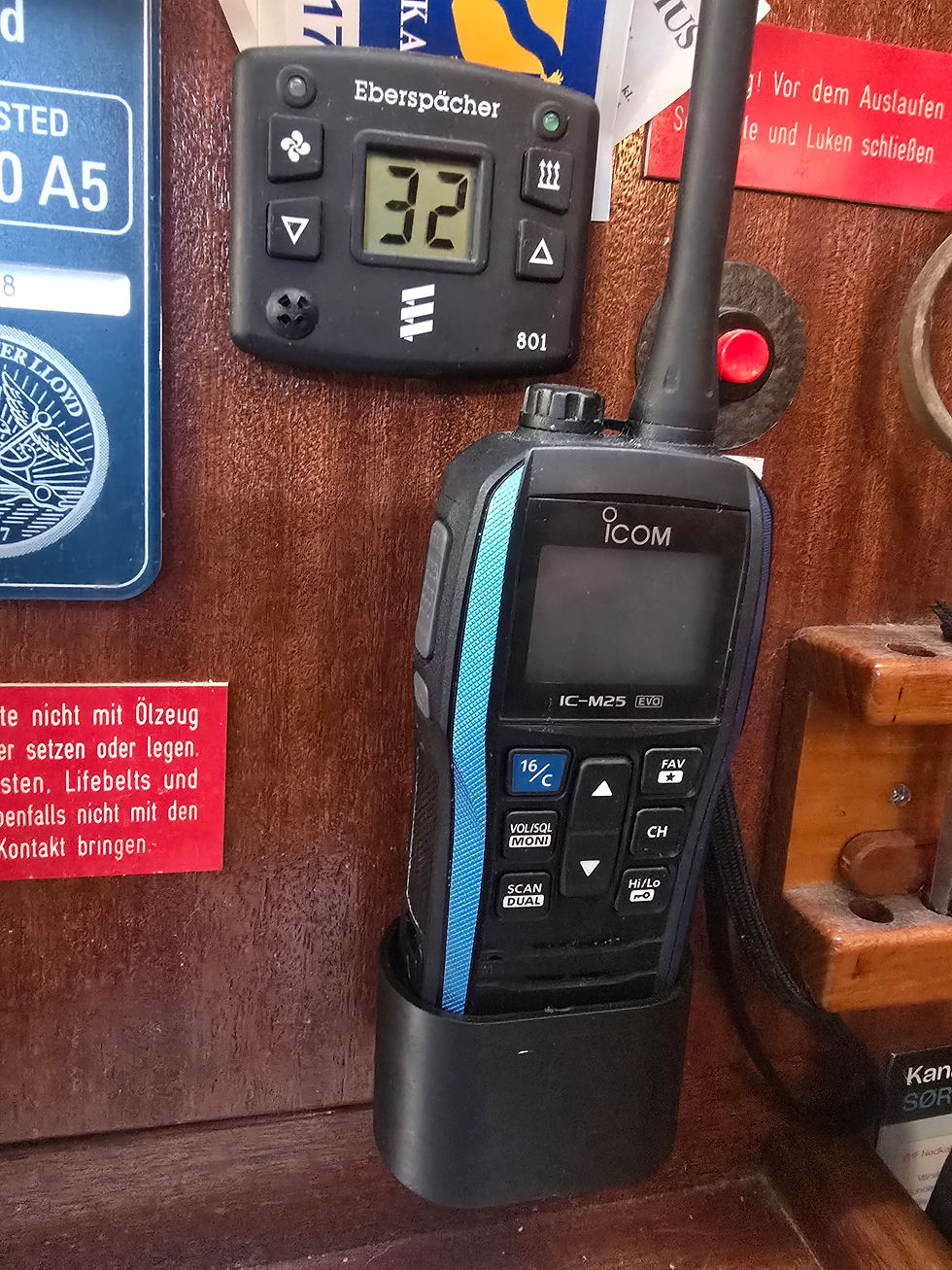
We are very happy with our 3D printer. Not only can we print very cool toys and accessories for our children and ourselves, but also a lot of practical things for the boat.
Not only this VHF holder, but paddle ore holder, bag holder, shelv brackets, loudspeaker covers +++. In totalt I would actually argue for that we are now at break even for the investment/use for this tool.
And we have only had it for 3 months so far:)
You can check out more of our designs and prints at Makerworld.
Sources


Comments